

Requisitos previos
- Una cuenta de Facebook.
- Acceso de administrador a tu Meta Business Manager. Si no tienes uno, puedes crearlo durante el registro incrustado. Tu cuenta no debe estar bloqueada.
- Tarjeta de crédito (solo Mastercard/Visa; American Express no se acepta).
- Un número de teléfono para registrar el remitente. Este número no puede estar conectado a ningún servicio de WhatsApp (personal o WhatsApp Business API). Necesitas poder recibir verificación por SMS o voz.
Paso a paso
Inicia sesión con Facebook
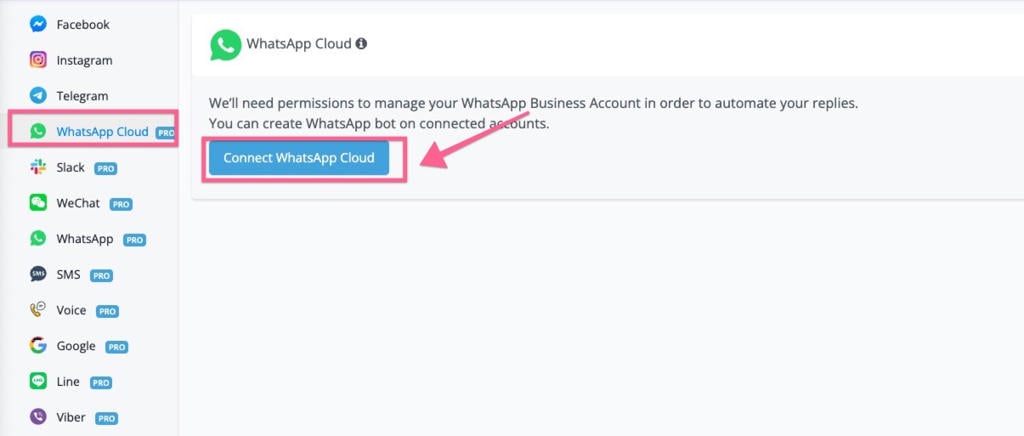
Connect WhatsApp Cloud
Crea o selecciona un Meta Business Manager
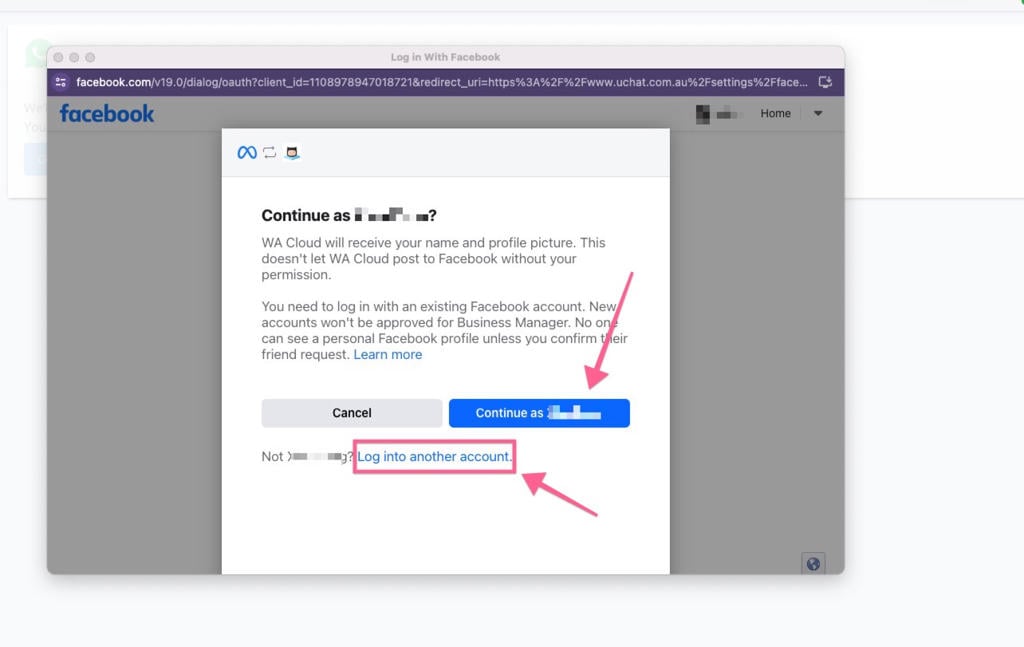
Selección o creación del Meta Business Manager
Crea el perfil de WhatsApp Business
- Nombre de tu WhatsApp Business Account (WABA): no aparece en tu perfil de WhatsApp.
- Display Name (nombre visible): debe ser revisado por Meta y es un factor clave para aumentar el límite de números. Debe mantener una marca consistente con fuentes externas (web, marketing) y cumplir las políticas de WhatsApp.
- Categoría del negocio (de la lista).
- Descripción del negocio (editable en cualquier momento).
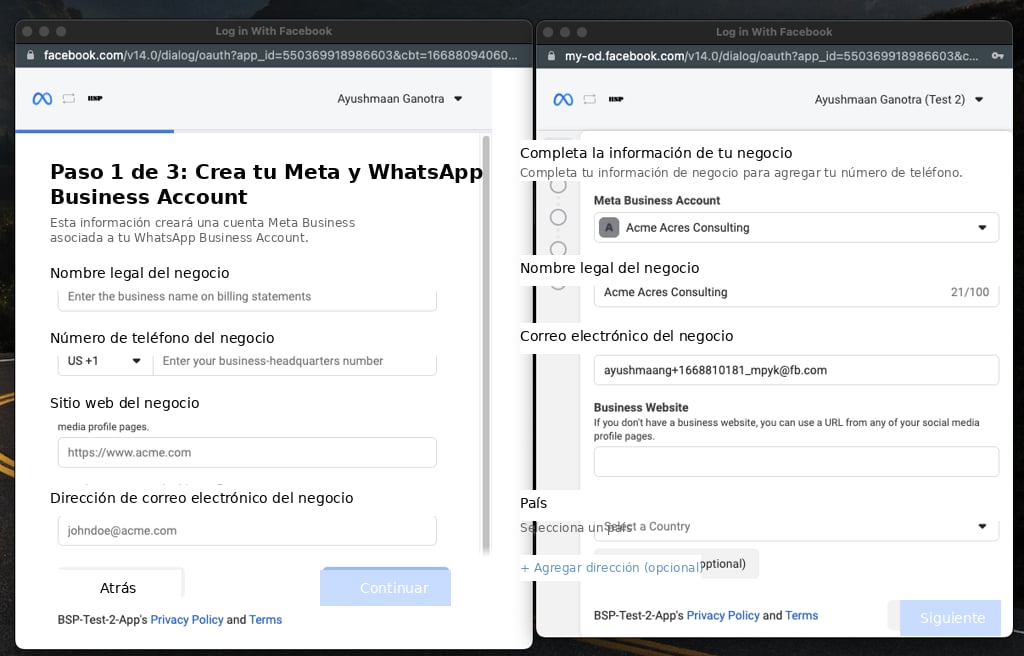
Perfil de WhatsApp Business
Verifica el número de WhatsApp Business
Verificación del número
Completa el registro del número
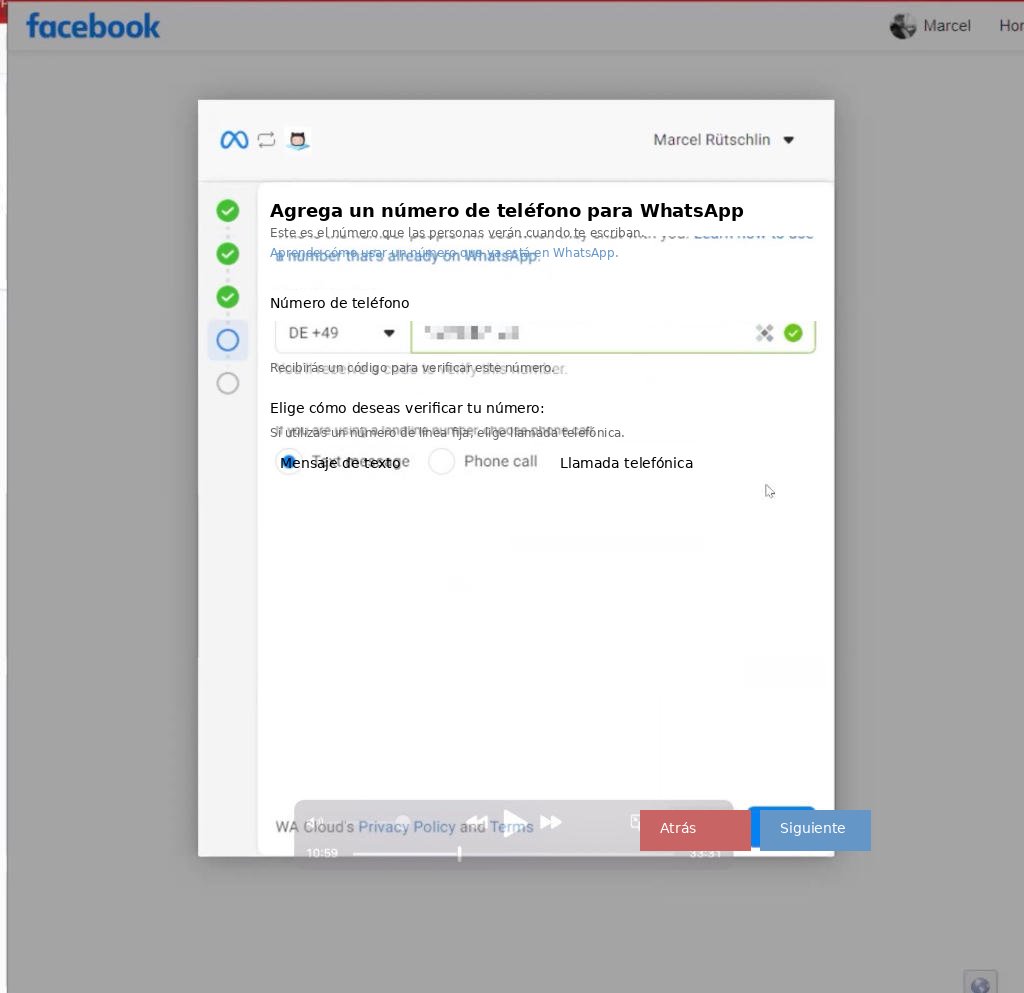
Registro del número hasta el estado Connected
Haz una verificación rápida de conexión
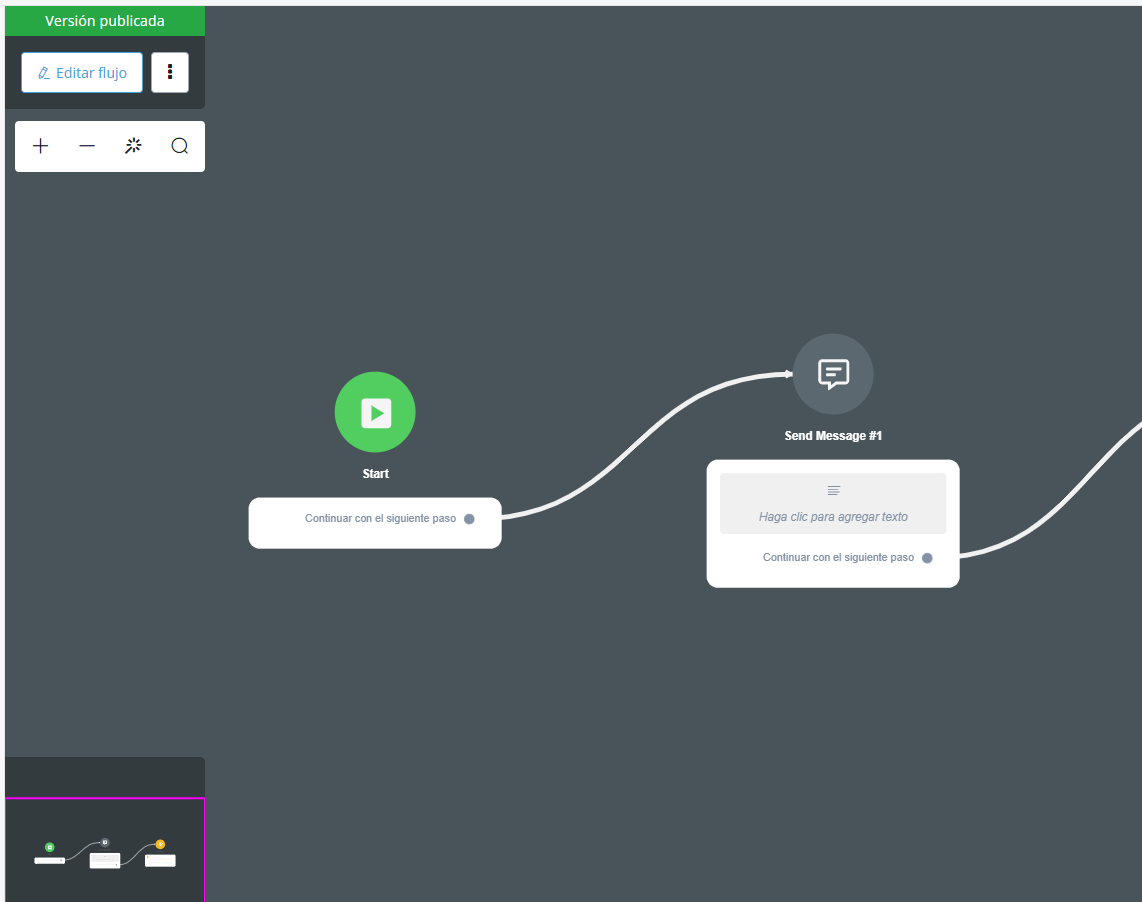
Verificación de conexión y sincronización de plantillas
Ajustes de WhatsApp Cloud
Haz clic en los tres puntos en WhatsApp Cloud para acceder a estas opciones:- Health Check
- Business Verification Status
- Check payment method
- Phone numbers
- Message Templates
- Catalog
- Two Factor Authentication
- De-Register number
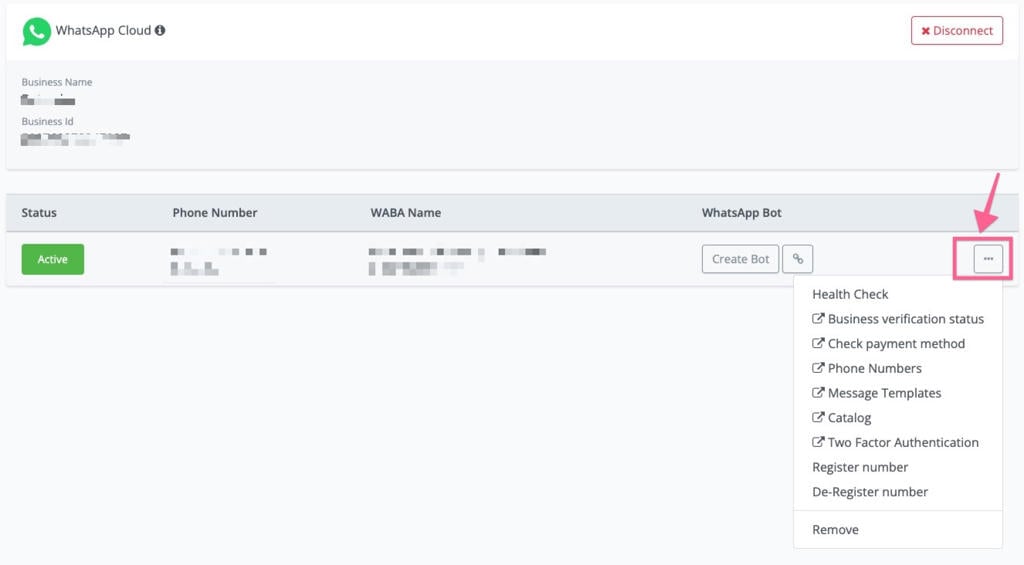
Menú de ajustes de WhatsApp Cloud
Verificación del negocio (opcional)
Sin completar la verificación, estás limitado a 2 números y 250 conversaciones diarias. Superar el límite dispara la cancelación automática de la cuenta tras 15 días (aunque las pruebas siguen siendo posibles). Una vez verificado, las WABA pueden incluir hasta 20 números y 1000 conversaciones diarias.Método de pago
Conecta una tarjeta de crédito válida a tus números WABA. Sin tarjeta válida, al enviar plantillas obtienes este error:Health Check
Muestra un resumen del estado del número, de la WABA y de la cuenta de Meta Business.Phone numbers
Una WABA requiere un número dedicado y válido. Estados posibles:- Connected: el remitente funciona normalmente.
- Flagged: ocurre cuando la calidad del remitente llega a estado bajo (rojo). No puedes subir los límites de mensajería durante este estado. Si la calidad mejora en 7 días, vuelve a Connected; si no, vuelve a Connected pero baja al siguiente tier inferior (el tier más bajo de negocios verificados es Tier 1).
- Restricted: ocurre al alcanzar el límite de mensajería. No puedes enviar mensajes salientes (notificación) hasta que se reinicie la ventana de 24 horas; solo respondes a mensajes iniciados por el usuario.
- Pending: haz clic en “registrate numbers” para conectar los números.
Message Templates
Redirige a la sección de plantillas en WhatsApp Manager. Crea y envía plantillas ahí; una vez aprobadas, sincronízalas a Botky. También puedes hacer clic en “New Template” en Botky para crearlas directamente.Catalog
Los negocios pueden habilitar Catálogos para compartir productos con mensajes de Multi y Single-Product. Al hacer clic en “Catalog” se redirige a WhatsApp Manager: elige un catálogo del desplegable y haz clic en “Connect Catalog”. Para sincronizar catálogos de Facebook al ecommerce nativo de Botky: Integraciones → E-commerce → Facebook Business → login → “List Business Catalogs”, encuentra el catálogo vinculado a tus números WABA y haz clic en “Facebook → Local”. Los productos se sincronizan a Productos. Necesitarás el retailID para enviar mensajes de catálogo (sincronizado al SKU).Actualizar el Display Name de WhatsApp
Puedes cambiar el display name hasta 4 veces cada 30 días. Ve a Meta Business Manager → WhatsApp Manager, selecciona el número, haz clic en Edit, ingresa el nuevo nombre (consistente con tu marca). Tras la aprobación de WhatsApp, re-registra tu número para activar el nuevo nombre.Cómo agregar números extra en Botky
Primero agrega los números a tu cuenta de WhatsApp Manager vía Meta Business Manager. Luego, en Botky, haz clic en “Sync numbers”; el número nuevo aparecerá. En settings, primero “Verify the phone number” (solo disponible para embedded signups nuevos; las conexiones antiguas de private app no la tienen) y luego “Register the number”.Catálogo de errores comunes del embedded signup
A. Errores al crear la cuenta de Business Manager
An error occurred while processing this request
An error occurred while processing this request
You have reached the limit for the number of Businesses you can create
You have reached the limit for the number of Businesses you can create
Your Facebook account is too new to create a business account
Your Facebook account is too new to create a business account
We limit how often you can post, comment or do other things...
We limit how often you can post, comment or do other things...
You're no longer allowed to use Facebook Products to advertise
You're no longer allowed to use Facebook Products to advertise
Your payment account is disabled
Your payment account is disabled
A User Can Only Create One Business User At One Time
A User Can Only Create One Business User At One Time
The name you chose for your business isn't valid
The name you chose for your business isn't valid
B. Errores al crear la WhatsApp Business Account
User does not have permission to create WhatsApp Business Accounts
User does not have permission to create WhatsApp Business Accounts
This WhatsApp Business Account is not available to use
This WhatsApp Business Account is not available to use
You can only create a limited number of WhatsApp Business Accounts...
You can only create a limited number of WhatsApp Business Accounts...
We can't verify the Facebook Business Account that you selected
We can't verify the Facebook Business Account that you selected
Something has gone wrong. You will need to contact support and try again
Something has gone wrong. You will need to contact support and try again
You have already linked the maximum number of phone numbers allowed
You have already linked the maximum number of phone numbers allowed
C. Errores de configuración del número
This phone number already exists in your list of phone numbers
This phone number already exists in your list of phone numbers
This number is registered to an existing WhatsApp account
This number is registered to an existing WhatsApp account
Your verified name violates WhatsApp guidelines
Your verified name violates WhatsApp guidelines
Something has gone wrong (Business Profile)
Something has gone wrong (Business Profile)
D. Errores de verificación del número
Phone number ownership is already verified
Phone number ownership is already verified
Your phone number doesn't appear to be valid
Your phone number doesn't appear to be valid
You have guessed too many times
You have guessed too many times
There was an error verifying this phone number
There was an error verifying this phone number
You have requested your code too many times
You have requested your code too many times